See the article:
http://sqlmag.com/database-performance-tuning/seven-step-process-changing-database-collation
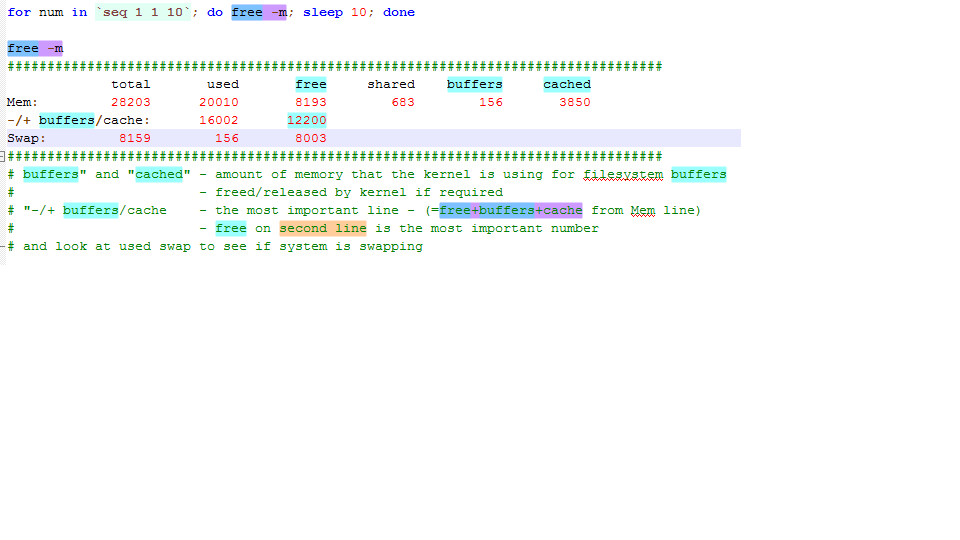 Real Memory Consumption = Total – (free + buffers + cached)
# free -m


             total       used       free     shared    buffers     cached
Mem:         15943      15678        265          6        511       3706
-/+ buffers/cache:      11460       4483
Swap:         8159          0       8159


# cat /proc/meminfo|grep -i huge

AnonHugePages:         0 kB
HugePages_Total:    4916
HugePages_Free:     3413
HugePages_Rsvd:       35
HugePages_Surp:        0
Hugepagesize:       2048 kB


The total memory reserved for huge pages is approximately 10 G ((4916 * 2048) /1024/1024)
This is approximately equal to 'used' on the second line of the 'free -m' command 11460/1024 = 11G

On an Oracle database server, the Huge Pages should be about 70-80% of the physical RAM  - varies with size, not a hard rule.

On an Oracle database server, the ulimits for the oracle user should be set accordingly - this means that the Oracle user
hard and soft limits for memory should be set high enough

Following files are modified to enable Huge Pages and disable transparent huge pages

/etc/grub.conf
kernel …… transparent_hugepage=never
--> reboot

Example:
8G RAM --> set 70% for Huge Pages = 5.6G --> set vm.nr_hugepages=2688 in /etc/sysctl.conf --> 5.55G HugePages

--> 2 databases with SGA_TARGET set to 2.6G or 1 database with SGA_TARGET set to 5.5G

MEMORY_TARGET set to 0 (AMM should be disabled when Huge Pages are configured)

/etc/sysctl.conf
vm.nr_hugepages=2688
(a number representing the number of pages – no unit)
Multiply by 2048 (K) and divide by 1024*1024 to get the number of GB of memory --> 5.55 G in this case

vm.hugetlb_shm_group=3000

/etc/security/limits.conf
e.g set 7G = 7*1024*1024 = 7340032          --> for a server with 8G of memory

Another example for memlock ulimits:
Set the value (in KB) slightly smaller than installed RAM. e.g. If you have 64GB RAM installed, you may set
soft memlock 60397977
hard memlock 60397977
(works out to 57G)
ipconfig /flushdns
$env
$env:path
$env:PSModulePath
Get-Childitem env:
When you want to capture a menu option, (that annoyingly disappears when you try to capture with snipping tool), use the following
procedure:
To get help about regular expressions in powershell, at the command prompt:
help about_regular_expression
use[master]
-- SQL Server authentication logins
select * from sys.sql_logins
-- all logins/users
select * from sys.server_principals order by type_desc
use [msdb]
select * from sysjobs

select * from sysjobactivity

select * from sysjobs_view

select * from sysjobhistory order by job_id, step_id
systeminfo | findstr /C:"System Boot Time"


$BootTime = (systeminfo | find "System Boot Time:").Replace("System Boot Time:","").Trim()
$BootTime


$Uptime = (Get-Date) - [datetime]$BootTime
$Uptime
-- see users logged - table variable example
DECLARE @whotable TABLE
(
   SPID INT,
   Status VARCHAR(1000) NULL,
   Login SYSNAME NULL,
   HostName SYSNAME NULL,
   BlkBy SYSNAME NULL,
   DBName SYSNAME NULL,
   Command VARCHAR(1000) NULL,
   CPUTime INT NULL,
   DiskIO INT NULL,
   LastBatch VARCHAR(1000) NULL,
   ProgramName VARCHAR(1000) NULL,
   SPID2 INT,
   REQUESTID INT
)

INSERT INTO @whotable EXEC sp_who2

select * from @whotable
-- see users logged - temp table example
CREATE TABLE #sp_who2
(
   SPID INT,
   Status VARCHAR(1000) NULL,
   Login SYSNAME NULL,
   HostName SYSNAME NULL,
   BlkBy SYSNAME NULL,
   DBName SYSNAME NULL,
   Command VARCHAR(1000) NULL,
   CPUTime INT NULL,
   DiskIO INT NULL,
   LastBatch VARCHAR(1000) NULL,
   ProgramName VARCHAR(1000) NULL,
   SPID2 INT,
   REQUESTID INT
)
GO

INSERT INTO #sp_who2
EXEC sp_who2
GO

SELECT *
FROM #sp_who2
GO

DROP TABLE #sp_who2
GO